
You see only what needs a human.
ActiValet files the noise in your Microsoft 365 inbox, sends you one short digest each morning, and drafts replies in your own voice. It never sends your mail, never deletes it, and anything it files goes back with one click.
25% off your first 12 months when you sign up by December 31, 2026, on both plans.
Meet ActiValet, presented by STACEY, ActiValet's AI assistant. AI-generated presenter and voice.
Only what needs you
Newsletters go to Reading, routine notifications are filed and marked read, cold outreach goes to Sales Solicitations, and vendor bills go to a folder for each vendor. Mail from real people stays in your Inbox.
One digest, every morning
At the time you choose, one short email: what needs you now, what's waiting on your approval, alerts worth a look, a spend watch on bills, and what was handled for you.
Nothing goes out without you
ActiValet has no permission to send mail. Reply drafts wait in your Drafts folder, tagged AI Draft, until you edit and send them yourself, or ignore them.
One digest replaces a morning of triage.
Each morning, at the time you set, ActiValet sends you one email in five sections: Needs you now, Waiting on approval, Alerts worth a look, Spend watch for bills and receipts, and Handled for you. It's the one email ActiValet ever sends, and it only ever goes to you.
It files the noise and keeps the people.
Every new message is checked against your VIP list, then classified. Newsletters, receipts, routine notifications and sales pitches are filed into your own Outlook folders, and duplicate copies are gathered in one folder. Mail from your VIPs, security and sign-in notices, and replies in your own conversations always stay in your Inbox, and anything ActiValet isn't sure about stays put. It suggests before it acts: a sender is filed automatically only once you've made a rule for it.
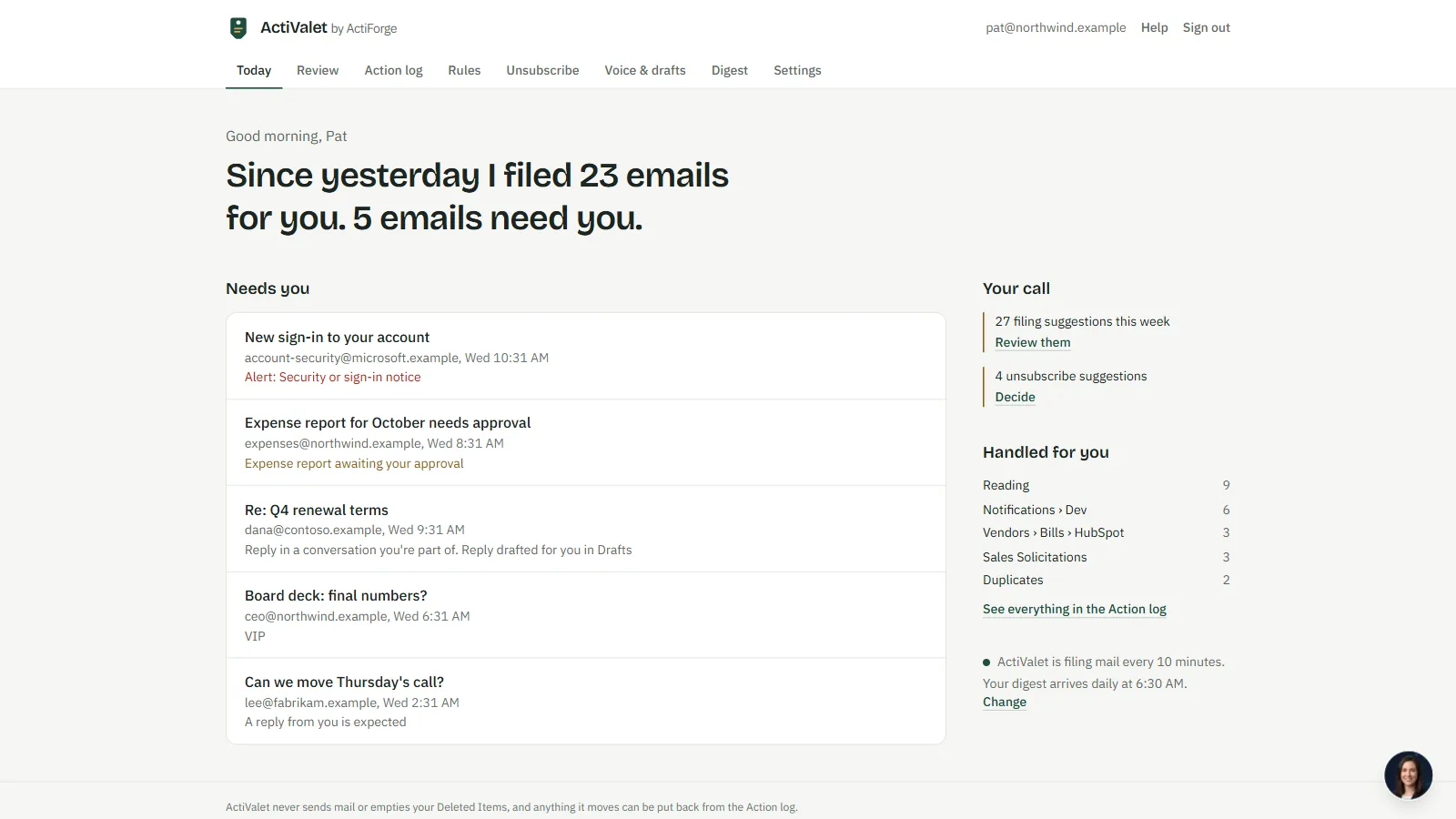
The Today page: what was filed, and the five emails that need you
Replies drafted in your own voice.
Pick three to fifteen emails you've sent. ActiValet writes a short description of how you write, without copying names, figures or details, and you approve it. From then on, emails that expect your reply get a draft in your Drafts folder, tagged AI Draft, with the earlier message below, plus suggested times when someone asks to meet. Anything ActiValet doesn't know is left in square brackets for you. Only you can switch drafting on, and ActiValet never sends a draft.
See what it suggests before it acts.
On Review, each row shows the email, what ActiValet suggests, why, and how sure it is. Agree with one? Choose "Always do this" for that address or everyone at that domain, and ActiValet shows which recent emails the rule would have caught. Not quite right? "Ignore" leaves the email in your Inbox and takes the suggestion away. Mail from your VIPs and security notices always stays in your Inbox.
Unsubscribe from what you never read.
Once a day ActiValet finds senders you never reply to, with at least three newsletters or sales emails in thirty days, a sender verified by Microsoft, and an unsubscribe link it can use. Approve one and it unsubscribes for you, and any later mail from that sender goes to Deleted Items. ActiValet never empties Deleted Items. The unsubscribe itself is the one thing you can't take back, so it only happens when you approve it.
Every filed email goes back with one click.
The Action log lists every change ActiValet made to your mailbox: what, when, from which folder to which, and why. Click Undo and a filed email goes straight back to where it came from. Rules are yours to make, turn off or delete, and a rule never overrides a VIP, a security notice or a conversation you're part of. Pause ActiValet from Settings whenever you like.
Easy to trust, easy to explain to your team.
ActiValet only opens the mailboxes your company approved by name, and Microsoft refuses it everywhere else. It keeps the sender, subject, time and folder of what it handles, so you can undo it, but never the text of your emails or attachments. To sort your mail, the AI sees the sender, the subject and a short preview. Securafy's team doesn't see your mail content by default.
Ask STACEY, ActiValet's AI assistant, what needs you or why something was filed. She can also offer to undo a move, clean up, switch a rule, pause ActiValet or change your digest time, and nothing runs until you click Do it or say yes. She can't send or delete mail, read the text of your email, unsubscribe you, or change billing.
Priced per mailbox. No credits to count.
Per mailbox, shared mailboxes included. Filing into your own folders, a folder per vendor for bills and receipts, duplicates gathered, the morning digest, unsubscribe help, rules, and the Action log with one-click undo.
Buy now Talk to Ric firstEverything in Valet, plus reply drafts in your own voice and drafts for meeting requests with suggested times, saved to your Drafts folder and never sent.
Buy now Talk to Ric firstIntroductory offer: 25% off your first 12 months when you sign up by December 31, 2026. Priced per mailbox per month, shared mailboxes included, with no cap on mail. Billed monthly in US dollars, plus applicable sales tax. No seat minimum and no annual contract. Microsoft 365 work accounts only; Gmail isn't supported yet.
ActiValet —
Your Questions Answered
An AI valet for your Microsoft 365 (Outlook) inbox. It files routine mail, keeps what needs a person in your Inbox, sends you one morning digest, and with Valet Pro drafts replies in your voice. You see only what needs a human.
It can't send: ActiValet has no permission to send mail, and the only email it ever sends is your own digest. It never deletes your mail either. When you approve an unsubscribe, later mail from that sender goes to Deleted Items, which ActiValet never empties.
Valet files your mail, gathers duplicates, sends the morning digest, helps you unsubscribe and keeps the Action log with undo. Valet Pro adds reply drafts in your own voice and drafts for meeting requests with suggested times. Drafts wait in your Drafts folder and are never sent.
Mail from your VIPs, security and sign-in notices, and replies in your own conversations always stay in your Inbox, and anything ActiValet isn't sure about stays put. If something is filed where you didn't want it, Undo puts it straight back.
ActiValet only opens the mailboxes your company approved by name. It never keeps the text of your emails or attachments; to sort mail, the AI sees the sender, the subject and a short preview. Your company's ActiValet admins see the same summary you do, never the content, and Securafy's team doesn't see your mail content by default.
Book a demo with Securafy and we'll handle the setup with you. Your Microsoft 365 global admin approves ActiValet, and your Exchange admin gives it access to the mailboxes you choose; that's typically done the same day. Each mailbox then starts in a free preview for up to 30 days, for up to 10 mailboxes, where ActiValet only suggests and changes nothing.
You subscribe before a mailbox goes live, after the free preview. Prices are per mailbox per month, plus applicable sales tax, with no seat minimum and no annual contract. Sign up by December 31, 2026 and you get 25% off your first 12 months.
No Copilot licence is needed: ActiValet works with the Microsoft 365 you already have. It supports Microsoft 365 work accounts only today; Gmail support is planned.